Didibet mobile app: what actually exists
Let’s get the awkward part out of the way in the first line: there is no Didibet app. No APK published by the brand, no iOS build, nothing in the App Store or Google Play that belongs to this operator. If you came here looking for a download link, the thing you are after does not exist, and any site that hands you one is either guessing or serving you somebody else’s file. What Didibet runs is a mobile site — the lobby, the live tables and the cashier, loaded in Safari or Chrome on your phone. That is not a fatal flaw, and for a lot of punters it is quietly better than a native app. It does change how you set the thing up, how you keep it secure, and what happens when your train goes into a tunnel halfway through a hand of blackjack.
This page is the practical version of that. How to pin the site to your home screen so it behaves like an app, what the download page on the operator’s site is really offering you, how much mobile data live dealer actually burns, and the one genuine trap on this brand’s site that can end with you installing a completely different bookmaker’s app by accident. If you want the wider picture first, start with what we found testing Didibet and come back to this page for the phone side.
There is no Didibet app — here’s what exists instead
Mobile gambling in Australia splits into three technical categories, and knowing which one you are dealing with matters before you tap anything. The first is a true native app, built by the operator and distributed through the App Store or Google Play. Second comes the sideloaded APK: an Android install file downloaded straight from a website, bypassing Google Play entirely. That is the standard workaround for offshore casino brands, because Google’s policies keep real-money casino apps out of the Australian Play Store. Third is the mobile web build, a responsive site that fills the screen, remembers your session and, if you ask it to, sits on your home screen behind its own icon.
Didibet sits firmly in the third category. What that means, line by line:
| What you might expect | What Didibet actually offers | What to do instead |
|---|---|---|
| Native Android app (brand APK) | None. No APK published anywhere on the operator’s domain | Open the site in Chrome and add it to your home screen |
| Native iOS app | None. No iPhone or iPad build exists | Open the site in Safari and use Add to Home Screen |
| “App Store” button on the site | Points at TabTouch Racing & Sports Bet — a different Australian betting brand entirely | Do not tap it. It will not take you to a Didibet product |
| “Google Play” button on the site | Points at the package com.sportsbet.sportsbetweb — that is Sportsbet.com.au, again a different operator |
Do not tap it. Same problem, different store |
| Live casino clients on the download page | QR codes for third-party provider apps — Playtech, Allbet, Gameplay, Joker, ClubSuncity — each with its own separate login | Treat these as separate products, not as a Didibet app. Ask support in writing how the credentials and balance work before installing |
| Push notifications for bonuses and results | Not available through a browser session in any reliable way | Check promotions manually, or ask support to notify you by email or Telegram |
| Offline play | Nothing works offline. Every spin, hand and bet is settled on the operator’s servers | Assume zero offline functionality and plan around connection quality instead |
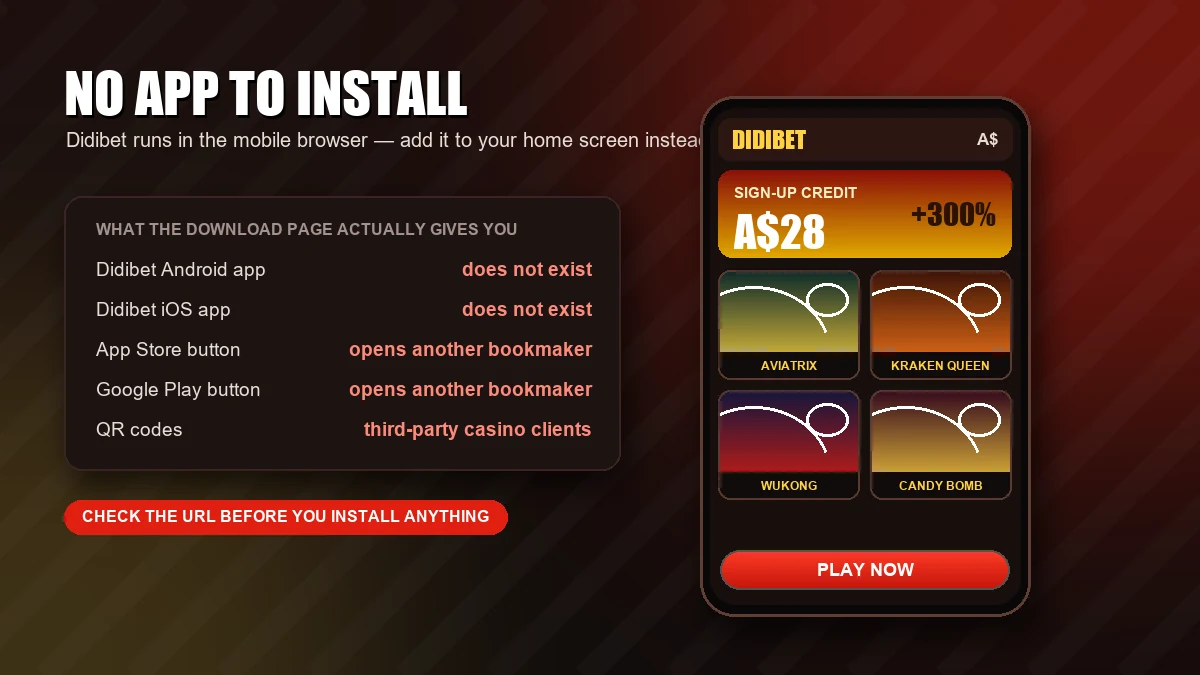
The upside of a browser-only brand is real and usually undersold. You are always on the current build, because there is nothing to update. Nothing takes up storage, and nothing asks for permissions — no contacts, no location, no file access, no “allow this app to run in the background”. On the Android side you also avoid the single riskiest act in offshore gambling, which is downloading an executable file from a website and telling your phone to trust it.
The downside is just as real. No push notifications, no app-level biometric lock, no background reconnection when your signal drops, and a session that lives inside a browser tab you can close by accident. The rest of this page is mostly about closing those gaps manually.
Open Didibet on your phoneThe download page trap
The operator’s site does have a download section, and it is the single most misleading page on the whole domain. Walk through it carefully, because the failure modes here cost real money.
First, the QR codes. What you find there are not Didibet apps. They are client applications belonging to the live casino platform providers that supply the tables: Playtech, Allbet, Gameplay, Joker, ClubSuncity. These are legitimate pieces of software in the sense that they are real provider clients rather than malware, but they are separate products with separate logins. Your Didibet username and password are not automatically the credentials for a Playtech or Allbet client. Before you install any of them, ask live chat two specific questions and keep the answers in writing: which credentials the client expects, and whether the balance inside it is the same balance as your main account or a segregated one. A wallet you cannot see from the main lobby is easy to forget about, and funds sitting in a third-party client are a standard cause of “where did my money go” tickets.
Second, and more serious: the store buttons. The “App Store” badge on the site links to TabTouch Racing & Sports Bet. The “Google Play” badge resolves to the package com.sportsbet.sportsbetweb, which is Sportsbet.com.au. Both are established Australian betting brands with nothing to do with this operator. It looks like a template defect rather than anything deliberate, the sort of thing that happens when a generic casino theme ships with placeholder store links and nobody swaps them out. For a punter the effect is the same either way, and the sequence is worth picturing: you tap the badge expecting a Didibet app, you land in the store, you install an app for a completely different bookmaker, you register there, you upload your driver’s licence there, and you deposit there. None of it touches your Didibet balance. You are now a customer of a company you did not intend to join, with your identity documents in their system.
How to tell an official gambling app from a lookalike
This is a useful habit regardless of which brand you play with, because the offshore sector is full of repackaged clients and fake listings.
- Read the developer name, not the app name. Store listings show who published the app. If the developer is not obviously the operator, the app is not the operator’s.
- Check the package ID. On Google Play it is visible in the URL after
id=. A mismatch between the package ID and the brand you searched for is decisive —com.sportsbet.sportsbetwebis Sportsbet, no matter what button you tapped to get there. - Look at install counts and review dates. A major operator’s app has years of reviews. A fresh listing with a few hundred installs and five-star reviews posted in one week is not a real product.
- Trace the APK to the brand’s own domain. If a file is not served from the operator’s own HTTPS domain, there is no chain of custody at all. APK mirror sites, Telegram channels and “free download” aggregators are exactly where repackaged clients with injected code live.
- Ask support and keep the reply. One message, asking whether they publish an official app and what the exact download URL is, takes a minute and settles it. For this brand, the accurate answer is that no brand app exists.
No app to install, nothing to update
The whole product runs in your phone's browser. Open it, sign in, and add it to your home screen in ten seconds.
Play in the browser, properly
Reaching a casino lobby through a saved bookmark is a slightly miserable business. A home-screen shortcut is not. Both platforms have supported this for years, it takes under a minute, and it gets you most of the way to app-like behaviour without installing anything.
Add to Home Screen on iPhone
- Open the Didibet site in Safari. This matters: the Add to Home Screen flow is a Safari feature, and while recent iOS versions expose it in other browsers, Safari is the path that reliably works.
- Tap the Share button, the square with the upward arrow, at the bottom of the screen on most iPhones.
- Scroll the share sheet down until you see Add to Home Screen. If it is not there, tap Edit Actions and switch it on.
- Rename it to something short and neutral. The name you type is what appears under the icon on your home screen, for anyone who picks up your phone.
- Tap Add. The icon lands on your home screen and opens the site in its own window, without the Safari address bar eating the top of the screen.
Two caveats. The shortcut is a web bookmark, not an installed app — it will not appear in your App Library the way apps do, and deleting it removes nothing but the icon. And because it opens in a separate window context, you may need to sign in there the first time even if you are already signed in inside Safari.
Add to Home Screen on Android
- Open the site in Chrome (Samsung Internet and Firefox have equivalent options in their own menus).
- Tap the three-dot menu in the top right corner.
- Choose Add to Home screen. Depending on the site’s configuration, Chrome may label this Install app instead — either option produces a working icon.
- Confirm the name, tap Add, and either drop the icon where you want it or let Android place it automatically.
Be realistic about what you get here. A true progressive web app install, the kind that runs in a fully standalone window with its own entry in the app switcher, depends on the site shipping a web app manifest and a service worker. Plenty of offshore casino sites do not, and the fallback is a plain shortcut that opens a Chrome tab. If that is what you end up with, nothing has gone wrong. It is still a one-tap route into the lobby, which is the point of the exercise.
What you gain and what you lose versus a native app
Both columns are worth setting out honestly. You gain: zero install risk, zero storage cost, no permission requests, no update prompts, and an icon you can delete in one second if you decide to take a break. You lose: push notifications for promotions and results; app-level biometric locking, so the phone’s lock screen is your only barrier; graceful reconnection, because a browser tab that gets evicted from memory reloads from scratch rather than resuming; and any offline capability at all, though in a real-money casino that last one is theoretical — nothing about a live table or a server-settled spin can work without a connection anyway.
The one gap that genuinely bites is memory eviction. Phones aggressively suspend background tabs to save power, and a lobby left open behind a couple of video calls will often reload and ask you to sign in again. Keep the session in front when you are actually playing.
Performance, data and battery
Mobile casino content has wildly different bandwidth appetites depending on what you are doing, and the difference between a pokie and an HD live dealer table is roughly a factor of fifteen. The chart below gives typical hourly ranges for each content type. These are indicative figures for this kind of content generally, based on how video streaming and lightweight game clients behave, not measurements published by the operator. Didibet publishes no data-usage figures, and nobody else’s are worth quoting as gospel either.
The practical reading: pokies and sports pages are effectively free on any modern plan, and live dealer is a video stream that will chew through a small data allowance in an evening. Three sessions a week on HD tables is comfortably over 3 GB a month, before anything else on your phone.
- Use Wi-Fi for live tables. Not just for the data cost — live dealer is latency-sensitive, and a dropped frame during a betting window is how you miss a bet you meant to place.
- Drop the stream quality. Most live clients expose a quality selector. SD on a phone screen is barely distinguishable from HD and roughly halves the bandwidth.
- Watch the battery. Sustained video decode plus a bright screen is the heaviest thing a phone does short of gaming. An hour at a live table will take a visible bite, and a warm phone throttles, which shows up as stutter you will blame on the casino.
- Low Power Mode is a trade-off. It extends the session but can pause background media and slow the reconnection you actually need mid-hand.
- Close the other tabs. Memory pressure is the main reason a lobby reloads itself, and every reload is a fresh sign-in.
Content type also drives the experience. Portrait-native pokies from the Asian studios in this lobby generally behave well on a phone. For what the catalogue actually holds, see mobile pokies. The sportsbook runs on third-party platforms, which means the betting interface is somebody else’s build rather than the casino’s, and in-play on mobile is where the difference in polish shows up most. The mobile cashier is the other place worth testing on your phone before you need it in a hurry.
Security on a shared or lost phone
A gambling account holds money and identity documents. On a phone, it also sits one tap away from anyone who picks the device up. Native apps at least offer an app-level lock; a browser session does not, so the compensating controls are manual.
- Give the account its own password. Long, unique, stored in a password manager. Offshore operators publish very little about how they store credentials, so assume reuse is the risk and eliminate it.
- Lock the phone properly. Face ID, fingerprint or a six-digit PIN. This is the only biometric layer in play here, and it protects the device rather than the session: a phone left unlocked is a casino account left open.
- Sign out, don’t just close the tab. Closing a tab usually leaves the session cookie alive. Use the account menu’s sign-out. If the site offers a “log out of all devices” option, use it after you have been on anyone else’s hardware.
- Think twice about saved passwords on a shared phone. Browser autofill on a family iPad means everyone in the house has the account. A private or incognito window leaves no session behind, at the cost of signing in each time.
- Mind the camera roll. Screenshots of balances, KYC uploads and payment confirmations sync to iCloud or Google Photos by default and stay there indefinitely. Delete them, or keep them in a locked album.
- Protect the recovery email. Support for this brand runs through a live chat widget, WhatsApp, Telegram and a Gmail address rather than a corporate mail domain. Whatever address your account is registered to is the key to the account, so give it a strong password and two-factor authentication of its own.
Things to never do
Short list, and it is the same list at every offshore brand.
- Never sideload a casino APK from a third-party site. An APK is an executable. Installing one from an aggregator, a forum or a Telegram channel means trusting an unidentified party with everything your phone can do.
- Never install a “mod”, “hack”, “predictor” or “pattern” app. Outcomes are generated on the operator’s servers. Nothing running on your handset can influence them, so the only function such an app can have is harvesting what is on your phone.
- Never install a “mirror” or “clone” app. Mirror apps wrap the real site in a shell that can read everything you type into it, including your password.
- Refuse Accessibility and SMS permissions. Any gambling-adjacent app asking for accessibility services, SMS reading or device admin rights is asking for the ability to read your screen and intercept verification codes. There is no legitimate reason for it.
If a phone with an active session goes missing, work in this order: change the account password from another device, remotely lock or wipe the handset through Find My or Find My Device, contact live chat and ask for open sessions to be terminated, then check the transaction log and any saved payment methods for changes.
Set it up once, properly
Sign in, add the shortcut, set a unique password and log out when you are done. Five minutes now, no install risk ever.
When the connection drops mid-hand
This is the question that separates people who have played on a phone from people who have not. Australian mobile coverage being what it is outside the capitals, it will happen. What matters is knowing what your bet is doing while your screen is blank.
Live dealer. The table does not wait for you. Once a bet is confirmed and the betting window closes, the round runs and settles on the operator’s side — your balance reflects the result whether or not you were watching. The risk is not the bet already placed, it is the decisions you cannot make: in blackjack, an unmade hit-or-stand call is resolved by the table’s timer and house rules, usually by standing you. On roulette or baccarat there is no decision to miss, so a dropout between the bet and the result costs you nothing but the view.
Pokies. A spin is settled server-side the moment it is triggered. If the connection dies mid-animation, the result already exists; reconnecting either replays the animation or drops you straight to the settled balance. An interrupted feature round or free-spins sequence normally resumes on your next load of the game. If it does not, that is a support ticket, not a lost round.
Sports and in-play. Different rule, and the important one. A bet is only a bet once it is confirmed and appears in your bet history. If the connection dropped between tapping place and seeing the confirmation, assume it did not go on until you have checked. Check before you re-place it, or you will end up with two.
Your evidence, in every case, is the history: game or round history inside the client, bet history in the sportsbook, and the transaction log in the cashier. Screenshot the discrepancy with the timestamp visible before you contact anyone. Then take it to live chat with the round or bet ID, the exact time, the stake and the game name ready. Support also runs on WhatsApp (+61 450 399 243), Telegram (+61 472 488 752) and email ([email protected]). Since that last one is a standard Gmail address rather than a corporate domain, keep your own copies of anything that matters. Ask for the resolution in writing either way.
One Australia-specific thing to know before you diagnose a fault. The ACMA added this operator’s domain to its blocking register in October 2025 under the Interactive Gambling Act, and Australian ISPs, mobile carriers included, are asked to act on that register. So a page that loads on one network and not another is not necessarily broken. If the site works on your home Wi-Fi but not on mobile data, or the other way round, you are probably looking at network-level filtering rather than an outage, and support is the place to confirm it.
Mobile and your limits
Gambling is strictly 18+, and a phone changes the risk profile more than most punters admit. A desktop session means sitting down at a desk. A phone session needs nothing at all: it happens in a queue, on a couch, at 1am when you cannot sleep. The friction that used to cap how often you played is gone, and frequency rather than stake size is what quietly turns entertainment into a problem.
Practical controls on a browser-based setup, in rough order of effectiveness:
- Delete the home-screen icon. The whole point of the shortcut was to remove friction. Removing it puts the friction back, and it takes one long-press.
- Use the phone’s own limits. Screen Time on iOS and Digital Wellbeing on Android will block a website or cap time on it per day. Have someone else set the passcode.
- Strip the stored payment details. Remove saved cards from the browser’s autofill and delete the saved password. A deposit that takes two minutes of typing is a deposit you get a chance to reconsider.
- Set account limits if they exist. Deposit and loss limit tools are not documented on the public site. Ask support directly what is available on your account and get the answer in writing before you need it.
- Know the gap. BetStop, Australia’s national self-exclusion register, binds Australian-licensed operators. It does not reach offshore brands, so self-exclusion here depends entirely on the operator honouring a request — which is a good reason to lean on device-level blocks rather than trusting one.
If it has stopped being fun, help is free, confidential and available around the clock through Gambling Help Online on 1800 858 858. Never play with money you need, and never chase a loss from a phone at night, because those two habits tend to turn up together. If you have not signed up yet and you are reading this to decide, create your account with limits in mind from day one rather than after the first bad week.
FAQ
Is there an official Didibet app for Android or iPhone?
No. The operator publishes no APK on its own domain and has no listing in the App Store or Google Play. The entire product runs in a mobile browser. Any site offering a “Didibet APK” is serving a file the brand did not publish, and installing it means trusting an unknown party with an executable on your phone.
Why do the App Store and Google Play buttons take me to other bookmakers?
Because the links point at other companies’ apps. The App Store badge resolves to TabTouch Racing & Sports Bet and the Google Play badge to the package com.sportsbet.sportsbetweb, which is Sportsbet.com.au. Neither is connected to this operator. It reads as an unedited site template rather than anything intentional, but the consequence is the same — tap them and you end up registering, verifying and depositing with a completely different bookmaker. Do not use those buttons.
Is it safe to install the apps behind the QR codes on the download page?
Those QR codes lead to live casino provider clients (Playtech, Allbet, Gameplay, Joker, ClubSuncity), not to a Didibet app. They are real provider software rather than anything malicious, but each one uses its own separate login, so your main account credentials do not necessarily apply. Before installing, ask live chat in writing which credentials to use and whether the balance inside the client is the same as your main account balance.
How do I add Didibet to my home screen?
On iPhone: open the site in Safari, tap Share, scroll to Add to Home Screen, name it and tap Add. On Android: open it in Chrome, tap the three-dot menu, choose Add to Home screen and confirm. Either way you get an icon that opens the lobby in one tap. It is a shortcut, not an installed app, so it uses no storage and deleting it removes nothing but the icon.
Does it work properly on an iPhone?
Yes. Because there is no native app on either platform, iPhone users are not missing anything Android users get — the browser build is the product for everybody. Safari handles the lobby, the live tables and the cashier, and the Add to Home Screen shortcut opens it in its own window without the address bar. The only iOS-specific quirk is that the shortcut may ask you to sign in separately the first time, since it runs in a different window context from the Safari tab.
How much mobile data does an hour of play use?
It depends entirely on what you play. Pokies are light, with roughly 25 MB an hour typical for that kind of content, while a live dealer stream is video and lands somewhere around 180 MB an hour in standard definition and 400 MB in HD. Sports pages are lighter still at around 10 MB. These are indicative ranges for this type of content, not operator measurements; Didibet publishes no data figures. The practical rule is simple: live dealer on Wi-Fi, everything else on mobile data without worrying.
What happens if my connection drops in the middle of a hand?
The round continues without you. Live dealer tables settle server-side, so a bet already confirmed is resolved whether you are watching or not, and any decision you fail to make is applied by the table’s timer and house rules. Pokie spins are settled the instant they are triggered, so the result exists before the animation finishes. The exception is sports betting: a bet that never reached a confirmation screen was probably never placed, so check your bet history before re-placing it or you will have two. Screenshot anything that looks wrong, with the timestamp visible, then take the round or bet ID to live chat.